
What is branded content advertising on Instagram? How can you create it?
In this article, Bluefocus will help you address these questions. Currently, Instagram stands as one of the top social media platforms with significant user traffic and engagement on the internet. It’s a vibrant marketplace for marketing and sales for businesses. Therefore, branded content advertising on Instagram can bring immense value to brands. Additionally, Facebook has noticed more and more brands incorporating branded content into their overall marketing strategies. Customers expect brand stories from a creative perspective, utilizing authentic and friendly content to resonate with the audience. Let’s join us in creating branded content advertising on Instagram.
Businesses advertising posts
With the creator’s consent, sellers are able to utilize advertising management tools to craft advertisements showcased on Instagram feeds or stories, aiming to promote branded content generated by the creator (unpaid branded content posts). Employing this functionality, businesses can exhibit these posts to users beyond the creator’s following, leveraging tools within the Facebook advertising platform to target specific audiences and analyze outcomes effectively.
Granting Permission for Branded Content Advertising on Instagram
Businesses must allow creators to tag their business Page in the story or post on their branded content source:
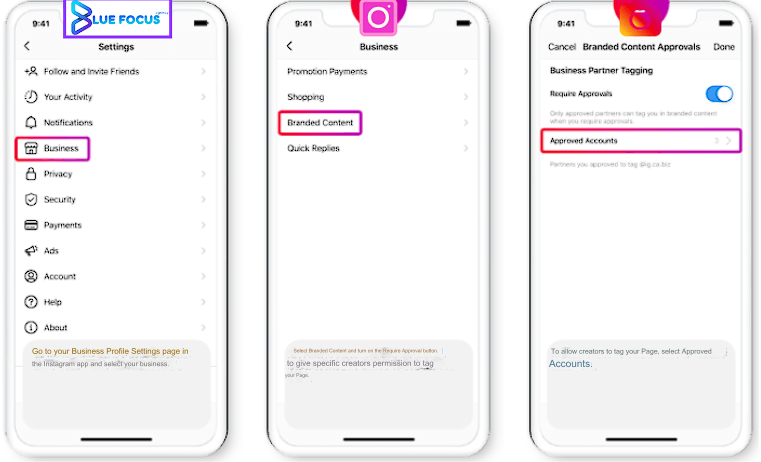
- Navigate to the Settings on your business’s Instagram homepage, select Business.
- Next, choose Branded Content and toggle the Require Approval button to grant specific creators the authority to tag your page.
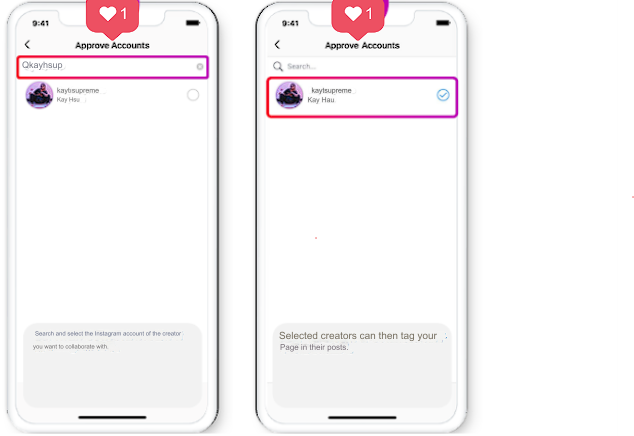
- When you wish to permit a creator to tag your homepage, please select Approved Accounts to approve the account.
- Search for and select the Instagram account you wish to collaborate with.
- Finally, the selected content creator can tag your Page in their posts.
Creating Branded Content Advertising on Instagram
After the creator has tagged your Page in the post containing branded content and granted you permission to advertise the post, you can follow the steps below.
Please note: Carousel posts are currently not supported; only static images and videos are supported. You can explore 6 advertising formats on Instagram with Bluefocus.
- Step 1: Navigate to Ads Manager and create the ad.
- Step 2: Choose from available objectives for your branded content advertising on Instagram.
- Step 3: In the setup process under Placements proceed to select Instagram as the data source, either Stories or Explore.
- Step 4: In the ad level, your branded content will appear under Use Existing Posts. Choose this option, then click on elect Post/Change Post under the Creative section.
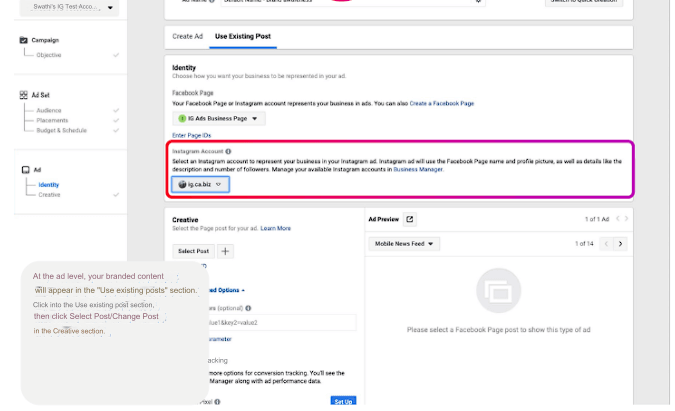
- Step 5: In the Select Post window, navigate to the Branded Content tab. Here, you will find a list of all posts containing branded content that the creator has permitted you to advertise.
- Step 6: You will see a preview of the advertisement here. If you are satisfied with the preview, click Confirm to finalize the creation of your branded content advertising on Instagram.
Understanding the Creator’s Version
Creating Dynamic Branded Content Ads on Instagram
Proceed to create a new dynamic post with branded content and grant advertising access to your partner:
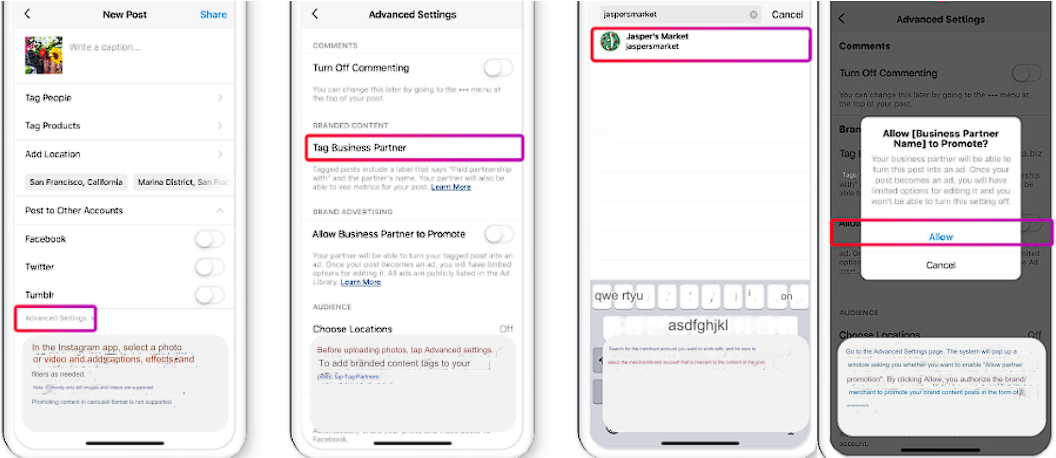
- Access the Instagram app, choose a photo or video, then add a caption, special effects, and filters if needed.
- Tap on ‘Advanced Settings’ before uploading the image. Then, add the branded content tag to your post by tapping on ‘Tag Partner’.
- Next, you’ll need to search for the collaborating seller’s account and ensure you select the relevant seller/brand account associated with the post content.
- Click on ‘Advanced Settings’. A window will pop up asking if you want to enable ‘Allow Partner Promotion’. By clicking ‘Allow’, you authorize the brand/seller to advertise this branded content on Instagram.
- Finally, after tagging the seller and enabling the ‘Allow Partner Promotion’ button, proceed to post the image.
Important Points to Note:
- Creators can edit or delete posts that have not been promoted by partners. However, they cannot edit or delete posts once the partner starts promoting them.
- In some cases, creators may not be able to edit or delete ads until the partner completely removes them.
- If creators do not want the posts to appear on their profile, they can archive the posts at any time.
- If creators do not want their posts to be advertised, they do not need to enable Allow Partner Promotion.
To grant permission for branded content advertising on Instagram for dynamic posts, follow these steps:
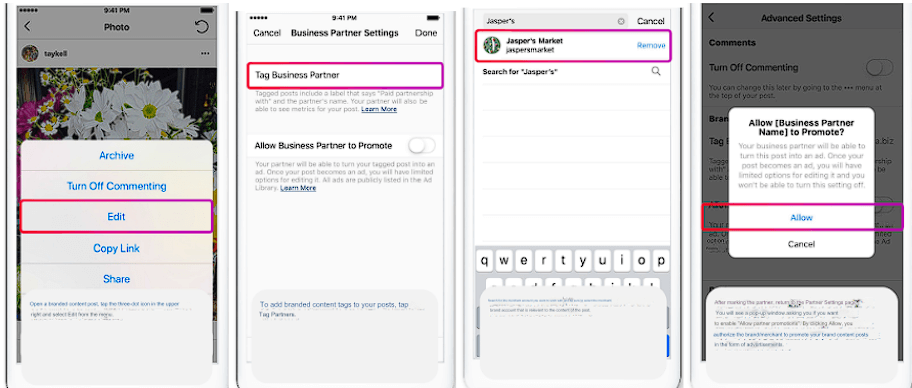
- Open the branded content ad post on Instagram, tap on the three-dot icon at the top right, and select ‘Edit’ from the menu.
- Choose ‘Tag Partner’ to tag the seller’s account in the post.
- Finally, the steps after tagging your partner are the same as before
When using branded content advertising photos on Instagram
The process of creating a new branded content story involves the following steps to grant advertising permission:
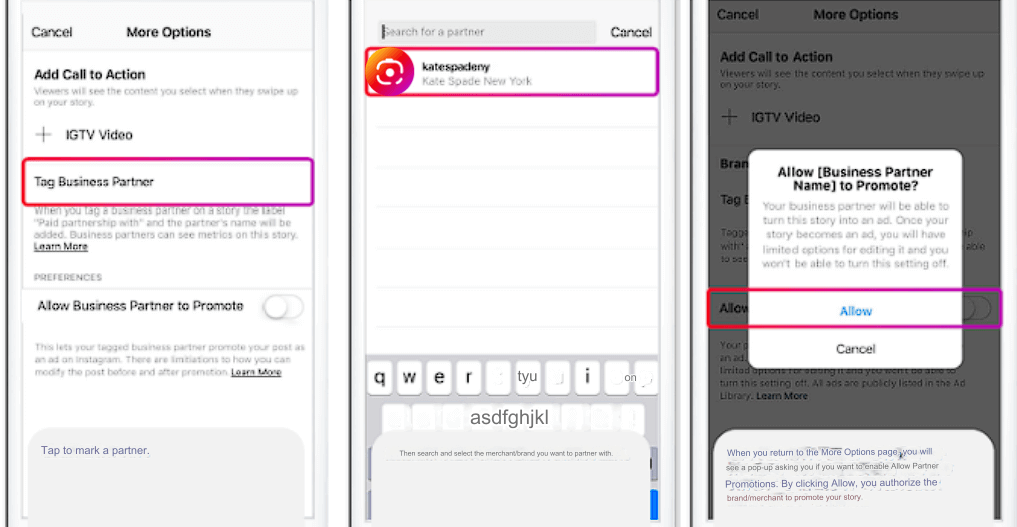
- Use the branded content photos or videos you wish to add to your story. Select the link icon at the top of the story creation page to open additional options.
Note: You cannot include hashtags, mention any accounts in text, or use stickers, GIFs, music, emoji reactions, or polls here. - Proceed to tag your partner, and the following steps are the same as before.
The steps for granting advertising permission for branded content on Instagram stories include:
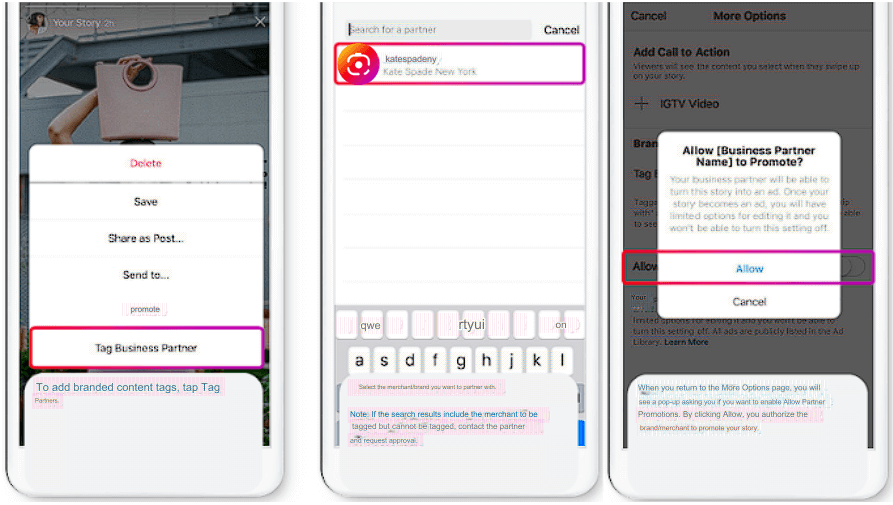
- To view unpaid branded content stories that you want to advertise, select the three-dot icon at the top of the story creation page to open additional options.
- The subsequent steps are also similar.
Points to Note When Using Branded Content Advertising on Instagram:
- Businesses must set up a private story album to promote branded content stories on Instagram as advertisements.
- After 24 hours, stories containing branded content will disappear from the creator’s profile but will be saved to their private album.
- Of course, expired stories cannot be edited, but advertisers can continue to advertise those stories as long as they are saved in the creator’s private album.
- Once a partner has placed an ad, advertisers cannot prevent future ads from being placed.
- In the event that a partner uses branded content advertising on Instagram, the creator will receive a notification in the Instagram app’s Branded Content section indicating that the post has been used to create an ad.
Conclusion
Leveraging Branded Content Advertising on Instagram can significantly enhance brand visibility and engagement. Bluefocus emphasizes the importance of establishing private story albums for seamless ad promotion and maintaining control over expired content. By fostering collaboration between businesses and creators, this advertising strategy not only expands reach but also ensures transparency and accountability in content partnerships. Trust Bluefocus to navigate the dynamic landscape of Branded Content Advertising on Instagram for optimal brand performance.
